- Published on
GitFlow on a banking app: the setup we actually used
- Authors

- Name
- Phat Tran
GitFlow has a reputation for ceremony, and most of it is deserved. We ran it anyway on FE Online 2.0, because on a banking app you have to know at any moment exactly what is in production and what is about to be. This post is the setup we used, commands included. The feol you will see in every branch name is the project's ticket prefix.
Branch naming
We fixed the naming convention before anything else, and it did more for us than any diagram. When a branch carries its ticket ID and status, nobody has to open the PR to figure out what it is for.
# Feature
# [WIP] is optional: add it when the ticket is not finalized but you need an early PR for review or tracking.
# A module tag like [CASA] can sit in front of the feature name when it helps.
Feature Branches: feature/feol-{ticket_id}_[{ticket_status}]_[WIP]_{feature_name}

Example: feature/feol-1_[in_review]_[CASA]_add_casa_journey

# Hotfix
# `feol-{ticket_id}` and `[ticket_status]` are optional: add them when there is a ticket.
Hotfix Branches: hotfix/feol-{ticket_id}_[ticket_status]_{hotfix_name}

Example: hotfix/wording_cta_feedback
         hotfix/feol-1_[in_review]_wrong_design_home

# Release
Release Branches: release/vx.y.z

Example: release/v1.4.0
Yes, the names get long. A branch name is typed once and read many times, usually by someone trying to work out what changed and why, so we optimized for the reader.
Branch strategy
Three branches matter. master mirrors production and is the source of truth. develop is where approved features pile up for integration testing. Feature branches like feature/feol-... are cut from master.
That last part is not textbook GitFlow. The textbook cuts features from develop. We cut them from master and treated develop as a merge target only, never a base, because at any given moment develop holds a mix of features still in testing, and none of that should leak into your branch. You will see this rule again below. In the team doc it was written in caps.
Features and releases
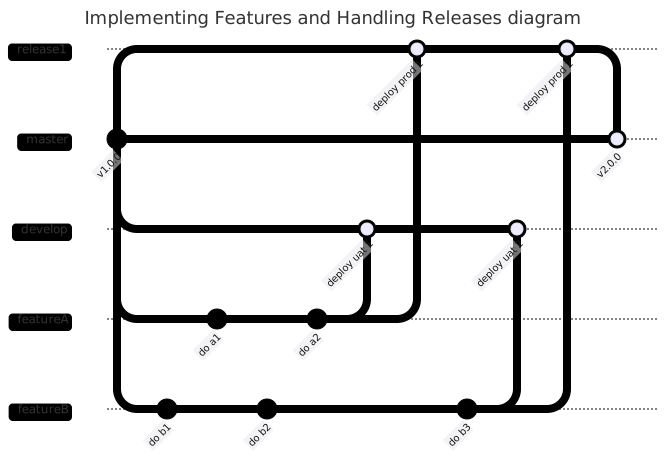
The feature flow
- Cut a feature branch from
master:
git fetch && git checkout master && git reset --hard origin/master
git checkout -b "feature/feol-xxx-Implement-feature-A"
- Commit to it until the feature is done:
git commit -am "feat: :zap: add transfer confirmation screen"
Open two pull requests for review: one to
master, one todevelop.If the review rejects it, go back to step 2. If it is approved, merge the feature into
develop. On conflict, resolve it ondeveloplocally: check outdevelop, merge the feature branch into it, and ask the people who touched the conflicting files instead of guessing. Then push.
git checkout develop && git fetch && git reset --hard origin/develop
git merge origin/feature/feol-xxx-Implement-feature-A
... resolve conflict ...
git commit -am "fix: :zap: resolve conflict"
git push origin develop
REMEMBER: never pull develop into feature/feol-xxx-Implement-feature-A. If you do, everything currently sitting on develop rides along into your feature and, eventually, into a release.
- Once the feature passes UAT, open a pull request to the next release branch and put the release milestone on it.
One thing worth spelling out: the PR to master never gets merged by hand. It exists to review the change against master and to hold the conversation. It merges automatically when the release PR that carries the feature is merged.
Releases
A release is a branch, and the branch goes through UAT before it gets anywhere near production.
- Cut
release/vx.y.zfrommaster:
git fetch && git checkout master && git reset --hard origin/master && git checkout -b "release/vx.y.z"
git request-pull origin/master ./ | grep -i feol-
The second line prints what the release will ship, filtered down to lines carrying the feol- ticket prefix. Because feature branch names contain their ticket IDs, the merge commits do too, and the output makes a decent checklist to hand to QC.
Deploy
release/vx.y.zto UAT.QC verifies every ticket on the release.
If something fails, cut a
hotfix/fix-...branch fromrelease/vx.y.z, fix it, open a PR back into the release branch, and send the build through QC again.When QC signs off, update
CHANGELOG.md, bump the version, and tag:
git commit -am "chore: bump version"
git tag -a v$(cat VERSION) -m "Release v$(cat VERSION)"
git push origin --tags
- Merge
release/vx.y.zintomasteranddevelop, then deploy to production.
Hotfixes
Production hotfixes skip the queue. Branch straight off master, fix, get it reviewed, then merge into both master and develop so the two do not drift apart. Same naming convention as everything else.
Looking back, two things carried most of the weight. The naming convention meant any branch, PR, or release could be traced to its ticket without asking anyone. And keeping develop strictly downstream of features made releases boring, in the good way: master always matched production, and the release branch always matched UAT. Nobody had to guess what was shipping.